
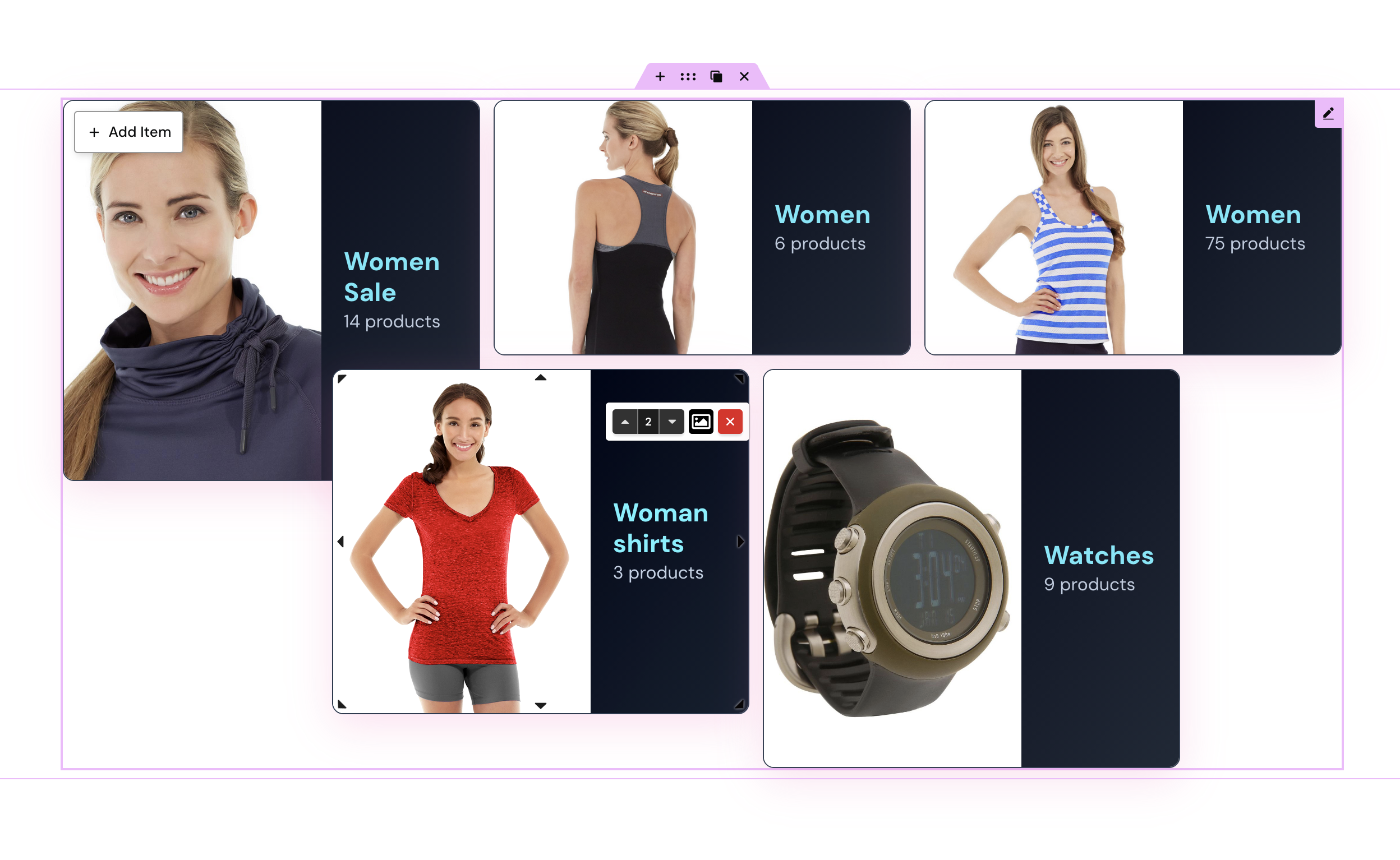

Welcome to Micemade plugins — a small but focused collection of WordPress plugins built for designers, developers, and store owners who care about layout. Whether you’re running a WooCommerce store or building content-rich pages in Elementor, these tools are designed to give you more creative freedom than the defaults allow. Here are plugins:

Block Plugin
Mosaic Product Layouts
A WordPress block plugin for WooCommerce that lets you escape cookie-cutter product grids and build free-form, creative layouts using a drag-and-resize grid system — right inside the block editor. Built because the default WooCommerce template system doesn’t offer enough creative freedom for truly standout product pages.
Four powerful blocks included: Products Layout, Categories Layout, Single Product Layout, and WC Carousel. Each uses the same flexible grid engine — position and resize items freely without touching a line of code. Apply starter layouts and style presets, then save custom setups for reuse.
Advanced product selection lets you filter by category, sort by bestsellers or newest, or hand-pick products — and combine those options. Each product item can have its own individual style override.
Pricing: from €19.99/year (single site), €49.99/year (5 sites), €79.99/year (100 sites). 15-day money-back guarantee.
- Free-form drag-and-resize grid layout
- Starter layouts and style presets
- Save and reuse custom layouts and styles
- Advanced product selection (category, order, hand-picked)
- Per-item style overrides
- Single product showcase block
- WC Carousel for scrollable product displays
- Lightweight and performance-friendly
Elementor Plugin
Mosaic Product Layouts for Elementor
The Elementor edition of Mosaic Product Layouts brings the same free-form grid engine to Elementor users — built natively for Elementor, with three dedicated widgets that give designers and store owners precise visual control without leaving the Elementor interface.
Products Layout, Categories Layout, and Single Product Layout widgets each use draggable, resizable grid composition with responsive editing for desktop, tablet, and mobile. Style presets and saved setups mean you build a polished WooCommerce layout once and reuse it across sections for your or client projects.
It connects to the WooCommerce Store API for modern product data loading, supports AJAX add to cart, built-in pagination, and image focal point controls. Works alongside the block editor version without conflict, and inside Elementor Pro templates for product archives, landing pages, and popups.
- Three Elementor widgets: Products Layout, Categories Layout, Single Product Layout
- Drag-and-drop positioning with responsive breakpoint editing
- Style presets and saved widget configurations
- WooCommerce Store API integration
- AJAX add to cart and built-in pagination
- Image focal point controls
- Works with Elementor Pro theme builder
- Compatible alongside the block editor version


Free
Block plugin
WC Spots
WC Spots does one thing, and does it well: it adds interactive product hotspots to showcase images on your WooCommerce store. Click a hotspot, and a popover appears with the product image, title, price, excerpt, and an add-to-cart button — no page navigation required.
Setup is genuinely simple — install the plugin, choose an image, assign products to hotspots, and you’re done. Hotspot styles, colors, shapes, and pulsate animations are fully customizable to match your brand. The popover layout is equally flexible: control image size, font sizes, colors, padding, and rounded corners.
WC Spots is completely free, super lightweight, and built to score high on Google PageSpeed Insights. It’s a focused tool that elevates product photography into an interactive shopping experience.
- Interactive product hotspots on any image
- Customizable hotspot styles, colors, and shapes
- Pulsate animation effect
- Fully customizable product popover (image, title, price, excerpt, add to cart)
- Multiple popover layout options
- Lightweight — great PageSpeed scores
- Free to use indefinitely

Free
Elementor Plugin
Mosaic Contents for Elementor
Mosaic Contents for Elementor brings the same free-form grid philosophy to general content — not just WooCommerce products. Posts, pages, custom post types, or any Elementor widget, all placed and sized freely on a snap grid that keeps everything aligned without constraining where things go.
Two widgets are included. Content Layout queries posts or any custom post type and lays them out as cards in a free-form grid — filter by taxonomy, control order, sticky posts, pagination, and add custom post-meta fields to each card.
Widgets Layout turns each grid cell into a drop zone for any native Elementor widget: headings, images, buttons, icons, Containers — stack multiple widgets per cell, nest Containers, drag widgets between cells. Elementor Pro is not required. Available free on WordPress.org.
- Content Layout widget for posts, pages, and custom post types in a free-form grid
- Widgets Layout widget — drop any Elementor widget into grid cells
- Drag-and-resize positioning on a snap grid
- Overlap and z-index controls for layered layouts
- Responsive editing for desktop, tablet, and mobile
- Post query controls: post type, taxonomy, order, sticky posts, pagination, meta
- Per-cell styling for Widgets Layout
- Saved setups and style presets
- Free on WordPress.org — Elementor Pro not required
Whether you’re building a WooCommerce store, an editorial blog, or a creative portfolio, these plugins give you layout tools that go beyond what WordPress offers out of the box. Explore them, try them, and build something worth looking at.
Leave a Reply