


In the world of fashion, presentation is everything. Whether it’s the beauty of a printed catalogue or the sleek interactivity of a modern online store, how clothing is laid out shapes how it’s perceived. With Mosaic Product Layouts, a WordPress plugin designed as an extension to both the Block Editor and WooCommerce, you can now build layout-driven product pages that echo the artistic style of high-end fashion catalogues—directly inside WordPress.
What makes this plugin special isn’t just its ease of use or its deep WooCommerce integration—it’s the creative freedom it unlocks. Mosaic allows you to design layouts where products are freely positioned, grid-snapped, styled, and layered—just like you might see in lookbooks, seasonal catalogues, or designer campaign pages.
The Idea: Crate Beautiful Catalog with a Default Theme
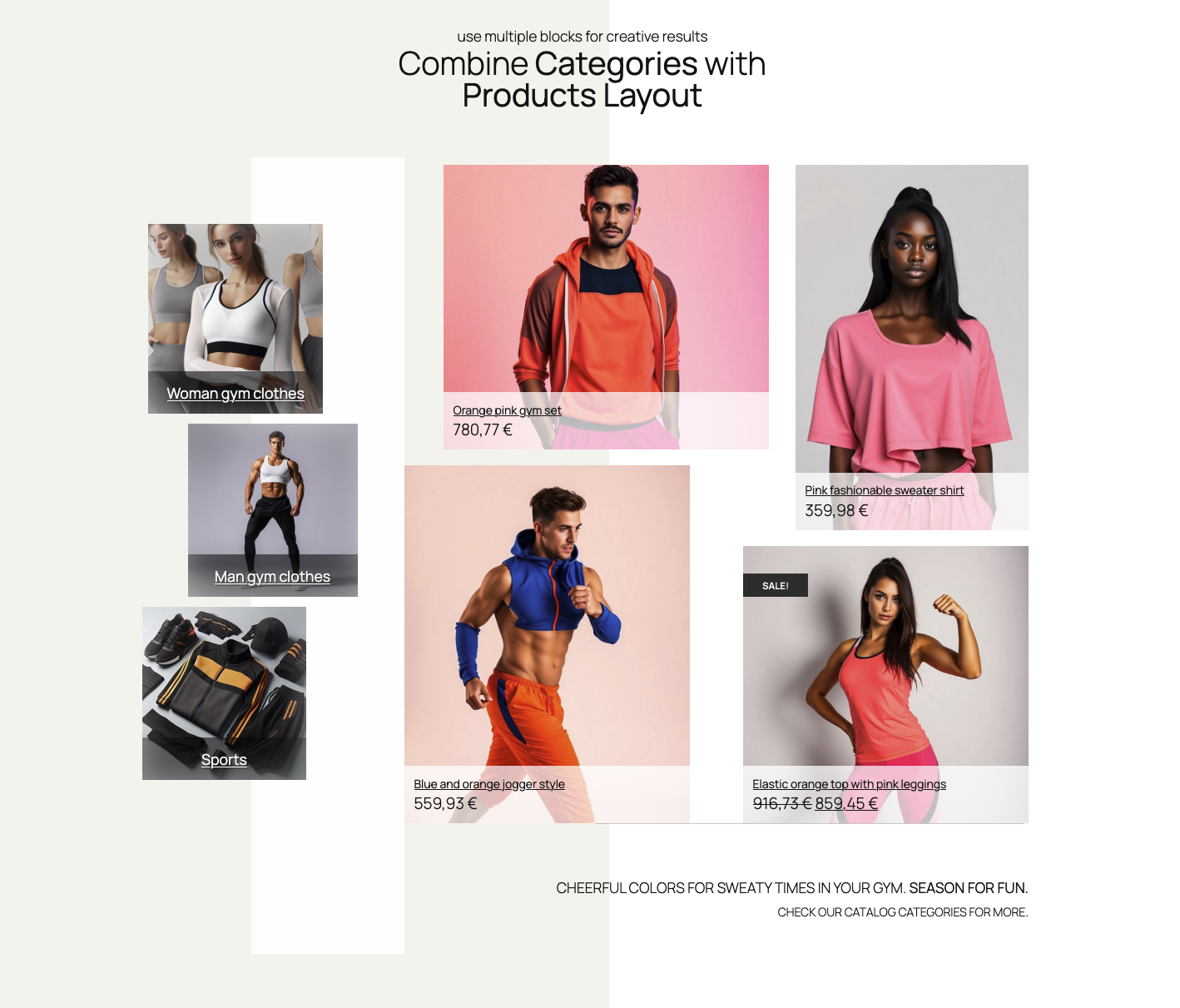
To demonstrate what you can achieve with a Mosiac Product Layouts, we took another level of challenge – instead of searching for Woo shop crafted theme (premium of free), or adapting our current theme in the Editor (Appearance > Editor), we decided to use one of WordPress latest default themes. Not because default themes are bad or ugly, but because default themes are great bare bones start, and included with every WordPress installation, for free. With basic theme and our Mosaic Product Layout, we can still create great looking, printed catalog-like design. For this purpose, we picked a default Twenty Twenty-Five theme. To preview, this is the end result:

And here’s how the layout looks live – on our site.
The Inspiration: Printed Catalogue Design
Before building these layouts, we browsed through hundreds of fashion magazine spreads, print catalogue templates, and editorial design mockups. What stands out across the board is the creative asymmetry, the mix of bold and minimal typography, the layered compositions, and the thoughtful use of white space.
Printed designs tend to combine images, text, and negative space in a way that’s both expressive and curated. That’s exactly the aesthetic we wanted to recreate—but with the flexibility and responsiveness of the web.
A Layout That Tells a Story

With Mosaic Product Layouts, you can drag and place product items anywhere inside the layout canvas, snapping to a grid for precision or going off-grid for a more dynamic look. Each product block gives you granular control over:
- Image format (square, portrait, full cover, masked)
- Typography styles for titles, prices, and descriptions
- Backgrounds and overlays use to emphasize image, or better blend product info
- Spacing and alignment, underlying grid system makes
Want a featured product to span a multiple columns while other products accompanying it on a side? No problem!
Combining beautiful product advert images with clean layout with featured products? Done.
Styling the Web Like Print—Responsively
While print is fixed and static, the web is flexible and responsive. Mosaic Product Layouts bridges the gap.
Each layout is fully responsive, meaning your designs adapt elegantly to screen sizes—scaling and repositioning where needed without losing their editorial charm. You can even define alternate arrangements for tablet or mobile, ensuring your catalogue maintains its feel across all devices.
Step-by-Step: From Blank Canvas to Boutique Layout
Here’s a quick walkthrough of how one might create a fashion catalogue layout using Mosaic Product Layouts:
- Add a Mosaic Layout Block to your page.
- Choose a starter layout and WooCommerce products
- Drag, resize, and position each product freely within the layout.
- Apply styling—set fonts, overlays, color themes, and custom text labels.
- Add design elements like headings, separator lines, or custom background sections.
- Preview the layout responsively, adjusting visibility or layout for mobile as needed.
Watch the video for a quick view on layout creation process.
Creative Freedom for Fashion Retailers
Whether you’re an independent designer, a WooCommerce shop owner, or a digital agency building client stores, Mosaic Product Layouts helps bring print-level design sensibility to your product pages, landing pages, or seasonal campaigns.

You’re no longer limited to rows and columns or standard shop grids. With Mosaic, the page becomes your canvas—and every product, a design element.
Try It Out
If you’ve ever admired the way clothing products are laid out in printed catalogues and wanted to bring that style-first approach to the web, Mosaic Product Layouts might be exactly what you’re looking for.
Install it today and start building layouts that look like print and feel like the web.



Leave a Reply